
MyChart review
 Analysis by GetAllApps
I think MyChart makes the most sense when you treat it as a practical companion to care you already receive, not as a replacement for talking with a clinician. It is a medical app from Epic Systems Corporation, and its usefulness depends heavily on whether the healthcare organizations you use support it. When it fits your care setup, keeping health-related tasks in one place can save time and make routine follow-up feel less scattered. When it does not, installing it alone will not create a connection to your providers.
What MyChart is good at—and where it fits
MyChart is free to download and is rated for Everyone. It has been available since 2011, and the current release is version 11.9.3 for devices running Android 11 or later. Its average rating is 4.4 from around 290,000 ratings, with more than 10 million installs. Those figures suggest that many people use it, but they do not guarantee that every clinic or hospital will offer the same experience.
I would start by checking whether your own provider uses MyChart and whether you can sign in or create an account through that organization. That is the key decision point. A health app can look polished and still be of limited use if the clinic you rely on is not connected to it. Conversely, if your care is already organized around MyChart, it can become a handy point of access for the parts of that relationship handled digitally.
For someone managing appointments, ongoing care, or information from more than one participating provider, the appeal is convenience rather than novelty. Instead of relying only on paper reminders, phone calls, or a collection of separate notes, you can use the app as a place to keep track of health tasks that your care team makes available. I see that as the strongest reason to try it: it can reduce small bits of administrative friction during an already busy week.
Speed expectations: quick access matters more than flashy design
With a medical app, I care less about elaborate animation and more about whether I can get to the right information without turning a simple task into a search. MyChart is best approached as a utility: open it with a specific purpose, such as checking something related to care or handling a routine follow-up, and then leave. That mindset makes the experience feel more useful than browsing it as if it were a general wellness feed.
I would not assume that every screen will feel equally quick. A response can depend on the phone, the connection, and the provider’s systems behind the app. In practical terms, if a page takes time to load, it may not mean the phone itself is struggling; the task may rely on information being retrieved from a healthcare organization. For anything time-sensitive, I would avoid waiting until the last minute to check a detail that could also be confirmed through the provider’s usual contact route.
A useful habit is to open the app before you are standing at a desk, boarding a bus, or trying to remember a detail during a call. If you need information for an appointment, check it when you have a stable connection and a little breathing room. That is a modest adjustment, but it prevents a slow connection or an interrupted session from becoming an avoidable source of stress.
Heavy-use moments: a calmer workflow for busy care weeks
MyChart is most valuable when several small health tasks land close together. Imagine a week with an upcoming visit, a question you want to raise, and follow-up responsibilities after an appointment. Rather than trusting memory alone, I would use the app as part of a simple routine: check it before the visit, make a short note elsewhere of the questions you want answered, and review what the care team has made available afterward. The app can support that workflow, but it should not be treated as a substitute for your own notes or for instructions you have been given directly.
One non-obvious advantage of a patient portal is that it can make preparation more intentional. Before opening MyChart, decide what you need to find. That stops a quick check from turning into aimless scrolling, especially if you are already worried about a health issue. I also find it sensible to verify important instructions through the channel your clinician asked you to use, rather than assuming a general app screen answers every personal medical question.
For people coordinating care with a family member, the app may be useful only when the appropriate account access has been arranged through the provider. Do not assume that being a relative automatically gives you access to someone else’s health information. If you are helping a parent or partner, ask the healthcare organization how it handles authorized access before relying on the app as a shared-care tool. This is a practical step that protects privacy and avoids confusion when a visit or follow-up is approaching.
Reliability: useful as a routine channel, not an emergency plan
I would use MyChart for ordinary administrative and care-related follow-up, while keeping another way to contact the provider available. A phone call or the provider’s established urgent-care instructions remain more appropriate when a problem needs immediate attention. An app is not a dependable substitute for emergency services, and a delayed screen should never determine whether someone seeks urgent help.
It also helps to distinguish app reliability from the availability of a particular provider’s information. MyChart is made by Epic Systems Corporation, but the care relationship and the organization’s own systems shape what a patient can access. If something you expect is missing, I would first check that you are using the account linked to the right organization and then contact that organization for guidance. Reinstalling the app or repeatedly signing in may not resolve an account or provider-side issue.
For everyday dependability, keep your sign-in details somewhere secure and make sure you can access the email or other account recovery method associated with your account. If you change phones, plan a moment to sign in and confirm access before an appointment rather than discovering a problem in the waiting room. These are ordinary precautions, but they matter more for a medical portal than for an app you can simply ignore for a day.
Device constraints and the trade-off with other options
The Android version requires Android 11 or later, so an older phone may not be able to run the current release. If you are unsure, check your device’s Android version before setting aside time to install it. On a supported phone, I would still keep the operating system and app reasonably current, since compatibility can change as devices and software evolve.
MyChart is free, which makes trying it a low-cost decision, but the real commitment is account access and learning whether your provider uses it. It is not a universal replacement for every hospital’s or clinic’s own digital tools. If your organization directs patients to another portal, that option may be more useful because it is tied to the care you actually receive. A generic health tracker can be better for recording personal habits, while MyChart is a more natural fit for provider-related tasks.
I would also keep expectations modest about phone resources. A medical portal is not a game or a media editor, so I would not choose it based on graphics or intensive processing. The more relevant constraints are having a compatible operating system, a working connection when you need to retrieve information, and a usable account. If the phone is old, storage is tight, or connectivity is unreliable, those issues may affect convenience even when the app itself is suitable.
Who should use it—and who may prefer another route
I would recommend MyChart to Android users whose healthcare provider supports it and who want a convenient way to handle routine digital interactions around care. It is especially appealing if you are comfortable managing an account on your phone and prefer checking details yourself rather than making a call for every small administrative question. Its broad adoption—more than 10 million installs—makes it a familiar option, though your own provider’s participation matters more than popularity.
I would skip it, or at least avoid making it your main channel, if your provider does not use it, you cannot meet the Android version requirement, or you prefer to handle health matters in person or by phone. It may also be a poor fit if checking medical information on a phone makes you more anxious than informed. In that case, use the communication method that helps you stay calm and ask your care team how to receive essential updates.
For a person who rarely interacts with healthcare providers, the app may not earn a place on the home screen. For someone with recurring appointments or ongoing follow-up, the convenience can be more meaningful. The right question is not whether every patient needs it, but whether it connects to the organizations and routines that already shape your care.
My performance verdict: dependable when the care connection is there
My overall view is that MyChart is a practical medical app whose value comes from reducing everyday friction, not from trying to do everything. I would expect a straightforward experience on a compatible Android phone, while allowing for delays caused by connectivity or the systems serving a provider. I would not judge its usefulness from a single slow moment, but I would keep a phone or other established contact method available for important matters.
The most helpful way to use it is with a clear routine: confirm that your provider supports it, make sure your account works before you need it, and check information when you have enough time to respond thoughtfully. Treat it as a convenient companion to care rather than a clinician, an emergency service, or a complete personal health record. That distinction keeps expectations realistic and makes the app easier to use well.
MyChart is a sensible choice if your care is already connected to it and you want a phone-based way to stay on top of routine tasks. It is less compelling when your provider uses another system or when you need immediate, guaranteed communication. For the right patient, I would recommend giving it a try; just make sure the healthcare connection behind the app is the one you actually need.
Pros and cons
Pros
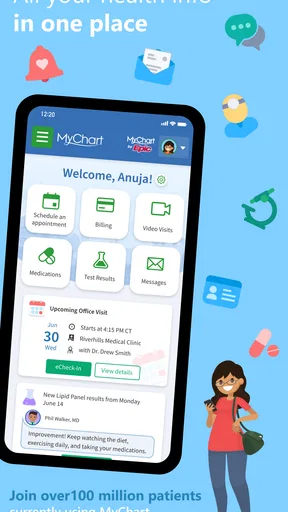
- View test results and health records in one place.
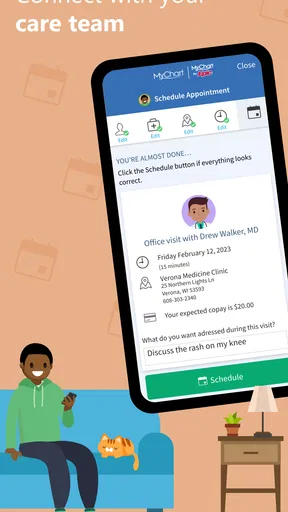
- Schedule appointments with participating providers.
- Request prescription refills through the app.
- Send secure messages to your care team.
- Manage access to health information for family members.
Cons
- Features vary depending on your healthcare provider.
- Some test results may appear before a clinician explains them.
- You need an account with a participating healthcare organization.
- Appointment options depend on provider availability.
- Biometric sign-in may not be supported on every device.


